

Certamente você como DBA já viu varias vezes determinadas consultas SQL se recusando a cooperar. Em outras palavras, a consulta SQL deveria utilizar o índice1 mais opta por utilizar o índice2 o que algumas vezes deixa a performance da SQL um lixo, literalmente.
Vários fatores podem estar provocando a seleção incorreta deste índice no plano de execução, coleta de estatísticas, parametrizações, entre outas. Contudo, alterá-las nem sempre é algo fácil pois podemos afetar diretamente a performance de outras consultas SQL assim como a performance de toda a base de dados (no caso de uma parametrização incorreta, por exemplo).
Utilizar um Hint? Sim… ou NÃO! As vezes não temos o acesso ao “código fonte” e solicitar ao fornecedor da aplicação o ajuste pode demorar.
Para contornar esta situação de forma rápida podemos criar um perfil SQL (SQL Profile). A abordagem de perfil SQL apareceu na versão 10g e permite a partir de então que “melhorias” sejam agregadas a uma instrução SQL sem que seu código fonte seja alterado.
Os perfis SQL são armazenados no dicionário de dados e podem conter detalhes de comparação de cardinalidade, seletividade de predicado, parâmetros e índices específicos. Tudo para melhorar o desempenho de uma instrução SQL.
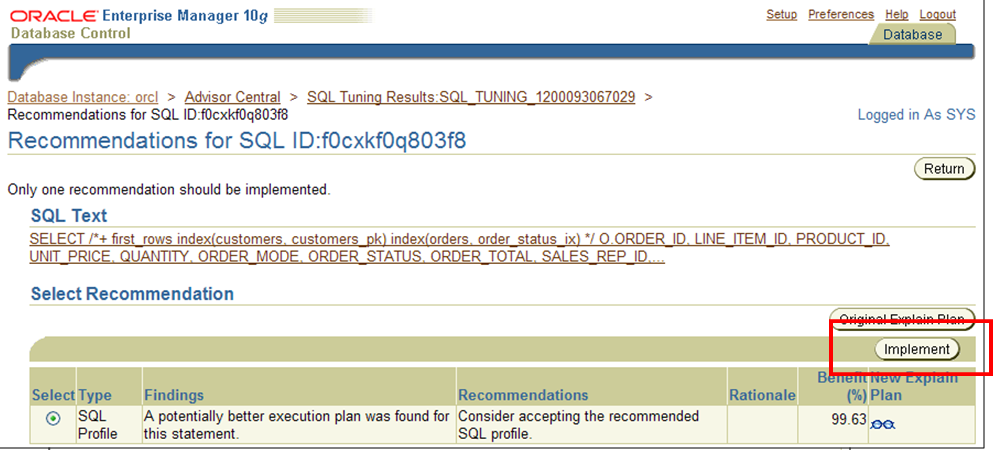
Normalmente temos contato com um perfil SQL quando executamos um SQL Tuning Advisor que dentre algumas recomendações oferece a implementação de um SQL Profile para ganhos de performance (imagem abaixo).
Na versão 11g com o surgimento das tarefas automatizadas de manutenção do banco de dados (DBMS_AUTO_TASK_ADMIN) temos o Automatic SQL Tuning Advisor que automaticamente identifica e tenta ajustar SQLs menos performaticos aceitando a utilização de SQL Profiles caso a opção ACCEPT_SQL_PROFILES for TRUE. Mas isto não vem a caso no momento, pois vamos implementar manualmente nosso próprio SQL Profile em uma instrução SQL.
Observem que a query abaixo esta executando em aproximadamente 2 segundos e utilizando o índice TABLE_X_IDX_2
SQL> set timing on
SQL> select *
  2    from (SELECT this_.*
  3            FROM TABLE_X this_
  4           WHERE this_.IND_EMIS = 1
  5             and this_.IND_STATUS = 6
  6             and this_.NUM_CONTROLE = 99999999
  7             and (this_.FLAG_IMP = 'N' or
  8                 this_.FLAG_IMP is null)
  9           ORDER BY this_.NUM_SEQ asc)
 10   where rownum <= 20
 11  /

no rows selected

Elapsed: 00:00:01.98
SQL> set timing off

SQL> explain plan for
  2  select *
  3    from (SELECT this_.*
  4            FROM TABLE_X this_
  5           WHERE this_.IND_EMIS = 1
  6             and this_.IND_STATUS = 6
  7             and this_.NUM_CONTROLE = 99999999
  8             and (this_.FLAG_IMP = 'N' or
  9                 this_.FLAG_IMP is null)
 10           ORDER BY this_.NUM_SEQ asc)
 11   where rownum <= 20
 12  /

Explained.

SQL> SELECT * FROM TABLE(dbms_xplan.display);

PLAN_TABLE_OUTPUT
-------------------------------------------------------------------------------------------------
Plan hash value: 1526119802

-------------------------------------------------------------------------------------------------
| Id  | Operation                     | Name            | Rows  | Bytes | Cost (%CPU)| Time     |
-------------------------------------------------------------------------------------------------
|   0 | SELECT STATEMENT              |                 |    20 |   153K|     1   (0)| 00:00:01 |
|*  1 |  COUNT STOPKEY                |                 |       |       |            |          |
|   2 |   VIEW                        |                 |    20 |   153K|     1   (0)| 00:00:01 |
|*  3 |    TABLE ACCESS BY INDEX ROWID| TABLE_X         |   214 |   339K|     1   (0)| 00:00:01 |
|*  4 |     INDEX RANGE SCAN          | TABLE_X_IDX_2   |   214 |       |     1   (0)| 00:00:01 |
-------------------------------------------------------------------------------------------------

Predicate Information (identified by operation id):
---------------------------------------------------

   1 - filter(ROWNUM<=20)
   3 - filter("THIS_"."IND_EMIS"=1 AND ("THIS_"."FLAG_IMP"='N' OR
              "THIS_"."FLAG_IMP" IS NULL))
   4 - access("THIS_"."IND_STATUS"=6 AND
              "THIS_"."NUM_CONTROLE"=99999999)

20 rows selected.
Apesar do tempo de retorno ser baixo, ele ainda pode ser muito melhor! Observem agora se eu forçar através de um hint a utilização do índice TABLE_X_IDX_1.
SQL> set timing on
SQL> select *
  2    from (SELECT /*+ index(this_ TABLE_X_IDX_1) */ this_.*
  3            FROM TABLE_X this_
  4           WHERE this_.IND_EMIS = 1
  5             and this_.IND_STATUS = 6
  6             and this_.NUM_CONTROLE = 99999999
  7             and (this_.FLAG_IMP = 'N' or
  8                 this_.FLAG_IMP is null)
  9           ORDER BY this_.NUM_SEQ asc)
 10   where rownum <= 20
 11  /

no rows selected

Elapsed: 00:00:00.03
SQL> set timing off

SQL> explain plan for
  2  select *
  3    from (SELECT /*+ index(this_ TABLE_X_IDX_1) */ this_.*
  4            FROM TABLE_X this_
  5           WHERE this_.IND_EMIS = 1
  6             and this_.IND_STATUS = 6
  7             and this_.NUM_CONTROLE = 99999999
  8             and (this_.FLAG_IMP = 'N' or
  9                 this_.FLAG_IMP is null)
 10           ORDER BY this_.NUM_SEQ asc)
 11   where rownum <= 20
 12  /

Explained.

SQL> SELECT * FROM TABLE(dbms_xplan.display);

PLAN_TABLE_OUTPUT
--------------------------------------------------------------------------------------------------
Plan hash value: 2411228134

--------------------------------------------------------------------------------------------------
| Id  | Operation                      | Name            | Rows  | Bytes | Cost (%CPU)| Time     |
--------------------------------------------------------------------------------------------------
|   0 | SELECT STATEMENT               |                 |    20 |   153K|     2  (50)| 00:00:01 |
|*  1 |  COUNT STOPKEY                 |                 |       |       |            |          |
|   2 |   VIEW                         |                 |   214 |  1647K|     2  (50)| 00:00:01 |
|*  3 |    SORT ORDER BY STOPKEY       |                 |   214 |   339K|     2  (50)| 00:00:01 |
|   4 |     TABLE ACCESS BY INDEX ROWID| TABLE_X         |   214 |   339K|     1   (0)| 00:00:01 |
|*  5 |      INDEX RANGE SCAN          | TABLE_X_IDX_1   |   214 |       |     1   (0)| 00:00:01 |
--------------------------------------------------------------------------------------------------

Predicate Information (identified by operation id):
---------------------------------------------------

   1 - filter(ROWNUM<=20)
   3 - filter(ROWNUM<=20)
   5 - access("THIS_"."IND_EMIS"=1 AND "THIS_"."IND_STATUS"=6 AND
              "THIS_"."NUM_CONTROLE"=99999999)
       filter("THIS_"."FLAG_IMP"='N' OR "THIS_"."FLAG_IMP" IS NULL)

21 rows selected.
Perfeito, ganho de 98% no tempo de execução. Mas e agora… como forço a utilização deste índice sem alterar o código?
Primeiramente vamos identificar nosso OBJECT_ALIAS que é necessário para construirmos a syntaxe correta para o SQL Profile.
SQL> select a.OPERATION, a.OPTIONS, a.OBJECT_NAME, a.OBJECT_ALIAS
  from v$sql_plan a
 where a.sql_id = 'b8fby5t7jb0x8';  2    3

OPERATION                      OPTIONS                        OBJECT_NAME                    OBJECT_ALIAS
------------------------------ ------------------------------ ------------------------------ ------------------------------
SELECT STATEMENT
COUNT                          STOPKEY
VIEW                                                                                         from$_subquery$_001@SEL$1
TABLE ACCESS                   BY INDEX ROWID                 TABLE_X                        THIS_@SEL$2
INDEX                          RANGE SCAN                     TABLE_X_IDX_2                  THIS_@SEL$2

5 rows selected.
Neste momento vamos transformar a hint em uma syntaxe aceita pelo perfil SQL utilizando o OBJECT_ALIAS capturado acima.
Observe a diferença na sintaxe entre o hint e o profile.
HINT:
index(this_ TABLE_X_IDX_1)
SQL_PROFILE (sqlprof_attr):
INDEX(@"SEL$2" "THIS_"@"SEL$2" ("THIS_"."TABLE_X_IDX_1"))
de outro modo podemos dizer que:
INDEX(@"OBJECT_ALIAS" "TABLE_ALIAS"@"OBJECT_ALIAS" ("TABLE_ALIAS"."INDEX_NAME"))
Agora criando efetivamente o SQL profile:
SQL> BEGIN
  2  DBMS_SQLTUNE.IMPORT_SQL_PROFILE
  3  (
  4  sql_text => 'select *
  5        from (SELECT this_.*
  6            FROM TABLE_X this_
  7           WHERE this_.IND_EMIS = 1
  8             and this_.IND_STATUS = 6
  9             and this_.NUM_CONTROLE = 99999999
 10             and (this_.FLAG_IMP = ''N'' or
 11                 this_.FLAG_IMP is null)
 12           ORDER BY this_.NUM_SEQ asc)
 13   where rownum <= 20',
 14     profile => sqlprof_attr('INDEX(@"SEL$2" "THIS_"@"SEL$2" ("THIS_"."TABLE_X_IDX_1"))'),
 15     category => 'DEFAULT',
 16     name => 'PROFILE_EXEMPLO_1',
 17     force_match => TRUE
 18  );
 19  END;
 20  /

PL/SQL procedure successfully completed.
O atributo force_match = true significa que o perfil SQL será utilizado para todas as declarações semelhantes, independentemente do valor de literais (se o SQL tiver alguma).
Executando novamente a query:
SQL> set timing on
SQL> select *
  2    from (SELECT this_.*
  3            FROM TABLE_X this_
  4           WHERE this_.IND_EMIS = 1
  5             and this_.IND_STATUS = 6
  6             and this_.NUM_CONTROLE = 99999999
  7             and (this_.FLAG_IMP = 'N' or
  8                 this_.FLAG_IMP is null)
  9           ORDER BY this_.NUM_SEQ asc)
 10   where rownum <= 20
 11  /

no rows selected

Elapsed: 00:00:00.05
SQL> set timing off
Para identificarmos se realmente o SQL profile esta sendo utilizado pela SQL podemos fazer um explain, logo abaixo ele traz uma Note (SQL profile “PROFILE_EXEMPLO_1” used for this statement)
SQL> explain plan for
  2  select *
  3    from (SELECT this_.*
  4            FROM TABLE_X this_
  5           WHERE this_.IND_EMIS = 1
  6             and this_.IND_STATUS = 6
  7             and this_.NUM_CONTROLE = 99999999
  8             and (this_.FLAG_IMP = 'N' or
  9                 this_.FLAG_IMP is null)
 10           ORDER BY this_.NUM_SEQ asc)
 11   where rownum <= 20
 12  /

Explained.

SQL> SELECT * FROM TABLE(dbms_xplan.display);

PLAN_TABLE_OUTPUT
--------------------------------------------------------------------------------------------------
Plan hash value: 2411228134

--------------------------------------------------------------------------------------------------
| Id  | Operation                      | Name            | Rows  | Bytes | Cost (%CPU)| Time     |
--------------------------------------------------------------------------------------------------
|   0 | SELECT STATEMENT               |                 |    20 |   153K|     2  (50)| 00:00:01 |
|*  1 |  COUNT STOPKEY                 |                 |       |       |            |          |
|   2 |   VIEW                         |                 |   214 |  1647K|     2  (50)| 00:00:01 |
|*  3 |    SORT ORDER BY STOPKEY       |                 |   214 |   339K|     2  (50)| 00:00:01 |
|   4 |     TABLE ACCESS BY INDEX ROWID| TABLE_X         |   214 |   339K|     1   (0)| 00:00:01 |
|*  5 |      INDEX RANGE SCAN          | TABLE_X_IDX_2   |   214 |       |     1   (0)| 00:00:01 |
--------------------------------------------------------------------------------------------------

Predicate Information (identified by operation id):
---------------------------------------------------

   1 - filter(ROWNUM<=20)
   3 - filter(ROWNUM<=20)
   5 - access("THIS_"."IND_EMIS"=1 AND "THIS_"."IND_STATUS"=6 AND
              "THIS_"."NUM_CONTROLE"=99999999)
       filter("THIS_"."FLAG_IMP"='N' OR "THIS_"."FLAG_IMP" IS NULL)

Note
-----
   - SQL profile "PROFILE_EXEMPLO_1" used for this statement

25 rows selected.
O que muitos se questionam é:
– E se meu SQL_ID mudar, o SQL Profile ainda será utilizado?
A resposta é simples. Depende!
Se você criou o perfil com force_match = true e for alterar apenas o valor das condições (literais) o sql_id vai mudar e o Perfil SQL ainda será utilizado. Se o force_match for false não será utilizado.
Observe o explain abaixo onde foi alterado apenas o valor da condição NUM_CONTROLE. (Utilizou o mesmo SQL Profile criado anteriormente)
SQL> explain plan for
  2  select *
  3    from (SELECT this_.*
  4            FROM TABLE_X this_
  5           WHERE this_.IND_EMIS = 1
  6             and this_.IND_STATUS = 6
  7             and this_.NUM_CONTROLE = 99999998
  8             and (this_.FLAG_IMP = 'N' or
  9                 this_.FLAG_IMP is null)
 10           ORDER BY this_.NUM_SEQ asc)
 11   where rownum <= 20
 12  /

Explained.

SQL> SELECT * FROM TABLE(dbms_xplan.display);

PLAN_TABLE_OUTPUT
--------------------------------------------------------------------------------------------------
Plan hash value: 2411228134

--------------------------------------------------------------------------------------------------
| Id  | Operation                      | Name            | Rows  | Bytes | Cost (%CPU)| Time     |
--------------------------------------------------------------------------------------------------
|   0 | SELECT STATEMENT               |                 |    20 |   153K|     2  (50)| 00:00:01 |
|*  1 |  COUNT STOPKEY                 |                 |       |       |            |          |
|   2 |   VIEW                         |                 |   216 |  1663K|     2  (50)| 00:00:01 |
|*  3 |    SORT ORDER BY STOPKEY       |                 |   216 |   342K|     2  (50)| 00:00:01 |
|   4 |     TABLE ACCESS BY INDEX ROWID| TABLE_X         |   216 |   342K|     1   (0)| 00:00:01 |
|*  5 |      INDEX RANGE SCAN          | TABLE_X_IDX_1   |   216 |       |     1   (0)| 00:00:01 |
--------------------------------------------------------------------------------------------------

Predicate Information (identified by operation id):
---------------------------------------------------

   1 - filter(ROWNUM<=20)
   3 - filter(ROWNUM<=20)
   5 - access("THIS_"."IND_EMIS"=1 AND "THIS_"."IND_STATUS"=6 AND
              "THIS_"."NUM_CONTROLE"=99999998)
       filter("THIS_"."FLAG_IMP"='N' OR "THIS_"."FLAG_IMP" IS NULL)

Note
-----
   - SQL profile "PROFILE_EXEMPLO_1" used for this statement

25 rows selected.
Agora se você alterar a query (adicionar/remover condições, por exemplo) um novo sql_id vai ser gerado e independente se o force_match for true ou false o SQL Profile não será utilizado.
Veja abaixo: (Adicionei um “and 1=1” )
SQL> explain plan for
  2  select *
  3    from (SELECT this_.*
  4            FROM TABLE_X this_
  5           WHERE this_.IND_EMIS = 1
  6             and this_.IND_STATUS = 6
  7             and this_.NUM_CONTROLE = 99999999
  8             and (this_.FLAG_IMP = 'N' or
  9                 this_.FLAG_IMP is null)
 10        and 1=1
 11           ORDER BY this_.NUM_SEQ asc)
 12   where rownum <= 20
 13  /

Explained.

SQL> SELECT * FROM TABLE(dbms_xplan.display);

PLAN_TABLE_OUTPUT
-------------------------------------------------------------------------------------------------
Plan hash value: 1526119802

-------------------------------------------------------------------------------------------------
| Id  | Operation                     | Name            | Rows  | Bytes | Cost (%CPU)| Time     |
-------------------------------------------------------------------------------------------------
|   0 | SELECT STATEMENT              |                 |    20 |   153K|     1   (0)| 00:00:01 |
|*  1 |  COUNT STOPKEY                |                 |       |       |            |          |
|   2 |   VIEW                        |                 |    20 |   153K|     1   (0)| 00:00:01 |
|*  3 |    TABLE ACCESS BY INDEX ROWID| TABLE_X         |   216 |   342K|     1   (0)| 00:00:01 |
|*  4 |     INDEX RANGE SCAN          | TABLE_X_IDX_2   |   213 |       |     1   (0)| 00:00:01 |
-------------------------------------------------------------------------------------------------

Predicate Information (identified by operation id):
---------------------------------------------------

   1 - filter(ROWNUM<=20)
   3 - filter("THIS_"."IND_EMIS"=1 AND ("THIS_"."FLAG_IMP"='N' OR
              "THIS_"."FLAG_IMP" IS NULL))
   4 - access("THIS_"."IND_STATUS"=6 AND "THIS_"."NUM_CONTROLE"=99999999)

19 rows selected.

SQL> set timing on
SQL> select *
  2    from (SELECT this_.*
  3            FROM TABLE_X this_
  4           WHERE this_.IND_EMIS = 1
  5             and this_.IND_STATUS = 6
  6             and this_.NUM_CONTROLE = 99999999
  7             and (this_.FLAG_IMP = 'N' or
  8                 this_.FLAG_IMP is null)
  9        and 1=1
 10           ORDER BY this_.NUM_SEQ asc)
 11   where rownum <= 20
 12  /

no rows selected

Elapsed: 00:00:01.97
SQL> set timing off
Varias outras “sugestões” podem ser atribuídas em um perfil SQL, vejamos alguns exemplos:
    'BEGIN_OUTLINE_DATA'
    'IGNORE_OPTIM_EMBEDDED_HINTS'
    'OPTIMIZER_FEATURES_ENABLE(default)'
    'OPTIMIZER_FEATURES_ENABLE(''11.2.0.2'')'
    'DB_VERSION(''11.2.0.2'')'
    'OPT_PARAM(''_b_tree_bitmap_plans'' ''false'')'
    'OPT_PARAM(''_optim_peek_user_binds'' ''false'')'
    'OPT_PARAM(''_optimizer_connect_by_cost_based'' ''false'')'
    'OPT_PARAM(''optimizer_index_cost_adj'' 10000)'
    'OPT_PARAM(''optimizer_index_caching'' 80)'
    'OUTLINE_LEAF(@"SEL$1")'
    'INDEX_RS_ASC(@"SEL$1" "T"@"SEL$1" ("T"."DATA_OBJECT_ID"))'
    'OPT_ESTIMATE(@"UPD$1", TABLE, "TABLE_X"@"UPD$1", SCALE_ROWS=2435195312)'
    'OPT_ESTIMATE(@"SEL$3", JOIN, ("TABLE_X"@"SEL$3", "TABLE_Y"@"SEL$3"), SCALE_ROWS=290.5026466)'
    'END_OUTLINE_DATA'
|
OBS: Varias sugestões podem ser atribuidas em um único perfil SQL.
Visualizando a composição/detalhes de um SQL Profile:
SQL> set lines 190
SQL> col OUTLINE_HINTS for a70
SQL> SELECT created, status, sql_attr.attr_val outline_hints
  2  FROM dba_sql_profiles sql_profiles, sys.SQLPROF$ATTR sql_attr
  3  WHERE sql_profiles.signature = sql_attr.signature
  4  AND sql_profiles.name = 'PROFILE_EXEMPLO_1'
  5  ORDER BY sql_attr.attr# ASC;

CREATED     STATUS   OUTLINE_HINTS
----------- -------- ----------------------------------------------------------------------
06-MAY-2013 ENABLED  INDEX(@"SEL$2" "THIS_"@"SEL$2" ("THIS_"."TABLE_X_IDX_1"))
Habilitando e desabilitando um SQL Profile:
SQL> EXEC DBMS_SQLTUNE.ALTER_SQL_PROFILE('PROFILE_EXEMPLO_1','STATUS','DISABLED');

PL/SQL procedure successfully completed.

SQL> set timing on
SQL> select *
  2    from (SELECT this_.*
  3            FROM TABLE_X this_
  4           WHERE this_.IND_EMIS = 1
  5             and this_.IND_STATUS = 6
  6             and this_.NUM_CONTROLE = 99999999
  7             and (this_.FLAG_IMP = 'N' or
  8                 this_.FLAG_IMP is null)
  9           ORDER BY this_.NUM_SEQ asc)
 10   where rownum <= 20
 11  /

no rows selected

Elapsed: 00:00:01.91
SQL> EXEC DBMS_SQLTUNE.ALTER_SQL_PROFILE('PROFILE_EXEMPLO_1','STATUS','ENABLED');

PL/SQL procedure successfully completed.

Elapsed: 00:00:00.02
SQL> select *
  2    from (SELECT this_.*
  3            FROM TABLE_X this_
  4           WHERE this_.IND_EMIS = 1
  5             and this_.IND_STATUS = 6
  6             and this_.NUM_CONTROLE = 99999999
  7             and (this_.FLAG_IMP = 'N' or
  8                 this_.FLAG_IMP is null)
  9           ORDER BY this_.NUM_SEQ asc)
 10   where rownum <= 20
 11  /

no rows selected

Elapsed: 00:00:00.04
Removendo um Perfil SQL:
 SQL> BEGIN
  2  DBMS_SQLTUNE.DROP_SQL_PROFILE(name =>'PROFILE_EXEMPLO_1');
  3  END;
  4  /

PL/SQL procedure successfully completed.

Elapsed: 00:00:00.03

Autor: Anderson Graf
Bacharel em Sistemas de Informação e MBA em Gestão de Banco de Dados Oracle. Entusiasta da tecnologia Oracle, ACE Associate ♠, autor em vários blogs e OTN. Consultor Oracle Senior na Exímio Soluções em TI
Envolvido em soluções de:
– Implementação, migração, gerenciamento e suporte a produtos Oracle, multiplataforma
– Monitoramento de ambientes 24×7
– Backup e Recovery
– Performance e Tuning
– Alta disponibilidade (HA) – RAC, Data Guard
– EM database/grid/cloud control
– Particionamento & Advanced Compression
– Oracle Engineered Systems – ODA, Exadata
Blog pessoal: http://www.andersondba.com.br
Articulista na Oracle Technology Network (OTN) – https://goo.gl/99R6yW
ACE Associate – https://goo.gl/MBB51b
Articulista GPO – http://profissionaloracle.com.br






Excelente!
Obrigado Roberto 😀